How to deliver wedding photos: timeline, selection and the gallery
Few clients wait for their photos as impatiently as a newly married couple. This guide walks through the whole handover: the sneak peek, the full gallery, the album selection and the guests.
The Monday after the wedding, the couple is still surrounded by cards and wilting flowers. A parent has asked about the photos three times already, and the maid of honour wants to know if the hen-do pictures are coming too.
Knowing how to deliver wedding photos well means more than sending files. The handover comes in stages and goes to several people: the couple, their families, the guests. Each stage raises its own expectations.
This article takes those stages in order. For the tools themselves (Drive, WeTransfer, Dropbox or a gallery), read our guide on how to deliver photos to clients. Here we focus on what makes a wedding different.
- Within a week
Sneak peek
Ten to twenty edited photos to share while the day is still fresh.
- 4 to 8 weeks
Full gallery
Every edited photo in full resolution, with clear notes on downloads and how long the link stays up.
- 2 to 4 weeks later
Album selection
The couple marks their favourites and you design the album draft from them.
- After sign-off
Album and extras
Prints, the album or a keepsake USB drive, if they are part of your package.
Common practice, not a rule. What counts is the date in your contract.
The sneak peek: a handful of photos in the first days
A sneak peek bridges the wait. Many wedding photographers send a small set within a few days, at most a week: a couple portrait, the ring exchange, a frame from the dance floor. Ten to twenty photos is plenty.
Pick images the couple will want to post straight away, and edit them in the style of the final set. A sneak peek that looks different from the finished gallery only raises questions.
A messaging app is fine if speed matters most, but it usually compresses the files. A small gallery with just these photos looks better, and the couple can forward one link to their parents.
How long to deliver wedding photos: a realistic timeline
Four to eight weeks is a common window for the full wedding gallery. In peak season, with a wedding every weekend, many photographers quote longer. What matters is that the couple knows the date before the wedding, not after it.
Put a deadline in the contract that you can still meet in your busiest month. Then check in once along the way, around week three: “Editing is going well, you’ll have the gallery by the end of the month.” That one message saves you five “any news?” emails.
How many photos should a couple get?
There’s no fixed number. As a rough guide, many photographers deliver 50 to 100 edited images per hour of coverage. For a full day, that often means 400 to 800 photos in the gallery.
The selection matters more than the count. Five near-identical shots of the cake cutting make the gallery longer, not better. In the contract, give a range rather than an exact figure, so you never have to pad the set with weak frames to hit a number.
How should the couple choose photos for the album?
If an album is in the package, you need the couple’s picks. Without clear guidance you get 200 favourites for 60 pages, or a list of filenames over WhatsApp.
So say up front how many photos the album holds, and give them two to four weeks. The easiest way is for the couple to choose inside the gallery by marking favourites. A cap on the number of picks helps, because it makes them prioritise for themselves.
Suggest they choose together, ideally on one evening at a big screen. If each of them picks alone on a phone, you get two lists that don’t match.
Who gets the gallery link: the couple, family or guests?
The full gallery belongs to the couple first. It holds the getting-ready photos, private moments, and guests who have no idea their picture is about to land in a family chat with 80 members.
Two ways to handle it
Either the couple decides who gets the link to the full gallery, or you put together a second, smaller gallery for guests: ceremony, group photos and the party, without the getting ready. The couple can post that link in the wedding group without a second thought.
Think about the guests’ privacy
A wedding gallery shouldn’t be open to the whole internet. Share the link with the people who need it, add a password when it makes sense, and ask before you post guests in your portfolio or on Instagram. Almost every wedding has children, colleagues or guests who would rather not appear online. If you work with clients in the EU or UK, remember that GDPR treats photos of identifiable people as personal data, which is one more reason to keep galleries private.
Should you deliver full resolution or web size?
The couple should get full-resolution files. Only those will make large prints, canvases or an album later without losing quality. Deliver finished, high-quality JPEGs, not RAW files.
Web-sized copies are a handy extra for Instagram or the family chat. Phones shrink photos when sharing anyway. Add a web set if you have the time, and always include the full resolution.
Downloads, backups and how long the gallery stays online
Couples usually want everything at once, and a ZIP download of the whole gallery saves them hundreds of single clicks. Suggest they start a large download on a computer, and open the link in a normal browser rather than inside the Instagram app, whose built-in browser can break large downloads.
An online gallery isn’t an archive. Tell the couple plainly to download the photos and keep them in two places, say a laptop and an external drive or a cloud backup. And say how long the gallery stays online: one year, three years, or for as long as your account exists.
Back up the edited files yourself as well, and write down for how long in the contract. Then the answer is clear when the couple gets in touch in five years because a hard drive died.
USB drives and albums: is physical still worth it?
For many couples, an album is the one thing still on the shelf twenty years later. Grandparents often prefer holding prints to scrolling a screen. If you offer albums, show them at the consultation.
A USB drive in a nice box makes the handover feel special. As the only copy, though, it’s a weak choice: drives get lost, and many laptops no longer have the right port. Treat it as a gift on top of the online gallery.
Mistakes to avoid
Promising a date you can’t keep
Say “within eight weeks” and deliver in six. The other way round costs you a review.
Sending the full gallery to the family group chat
The getting-ready photos belong to the couple. Ask who should get the full link before you send it.
Sending the link with no word on how long it lasts
If the gallery will go offline one day, the delivery email should say so, with a date.
Leaving the backup to chance
One line, “Please download everything and keep it in two places”, saves a hard conversation later.
Not keeping your own copy
Keep the edited files yourself for as long as your contract promises.
How to deliver wedding photos with PhotoCloud
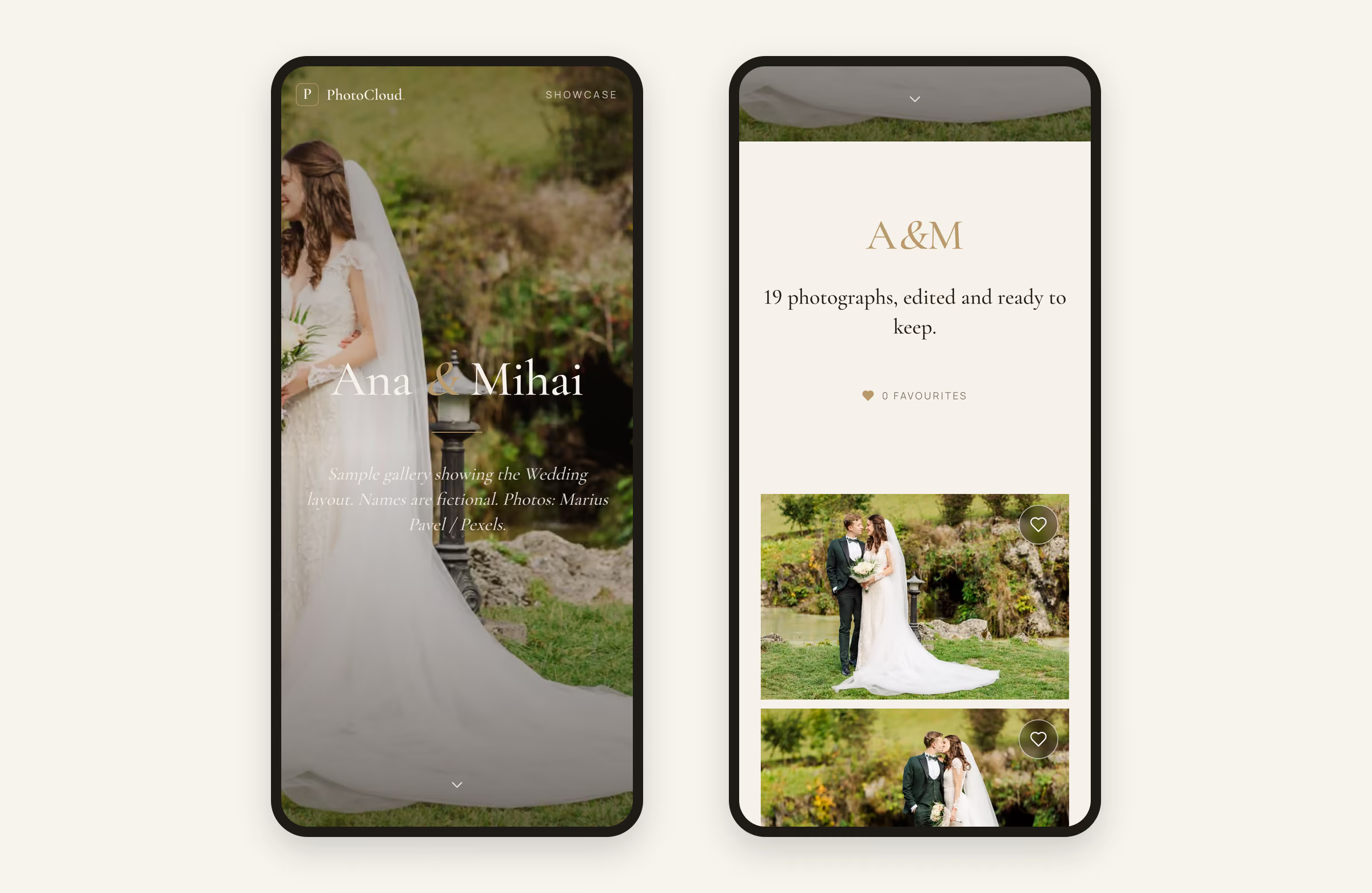
PhotoCloud has a layout made for weddings: a full-screen cover with the couple’s names in a light italic serif, a short intro note, then large photos in even rows. The couple opens the gallery on a phone or computer without an account, and downloads the photos as the originals you uploaded. A gallery holds up to 1,000 photos, enough for a full-day wedding.

On the Free plan you get unlimited galleries and 10 GB of storage, with no time limit. A sneak peek gallery and a guest gallery cost nothing extra. Just note that each gallery has exactly one link, and photos that sit in two galleries count twice towards your storage.
The couple can mark favourites on every plan. Starter, at €11 per month excl. VAT, adds password protection and a ZIP download of the whole gallery. It also adds proof selection with an optional limit on the number of picks, after which you deliver the finished photos under the same link. Starter’s detailed stats show which photos the couple loved most. Watermarks on proofs come with Pro.
PhotoCloud doesn’t sell albums or prints. Keep ordering those from your lab.
Frequently asked questions
How long should it take to deliver wedding photos?
A common rhythm is a sneak peek of 10 to 20 photos within a few days and the full gallery after four to eight weeks, sometimes longer in peak season. The deadline that counts is the one in your contract.
How many photos should a wedding photographer deliver?
As a rough guide, 50 to 100 edited photos per hour of coverage, so often 400 to 800 for a full day. Give a range in the contract rather than a fixed number.
Should guests get the same gallery link as the couple?
Not necessarily. The full gallery often holds private moments, so many photographers make a smaller guest gallery with the ceremony, group photos and the party. In PhotoCloud each gallery has its own link.
How long does a wedding gallery stay online?
That depends on the service and your contract. At PhotoCloud, galleries on the Free plan and on paid plans have no expiry date. The couple should still download the photos and keep them in two places.