Photographer email templates: 10 client emails to copy and send
From the booking confirmation to the anniversary note: the ten emails you write for almost every client, ready to copy, adapt and send from your own inbox.
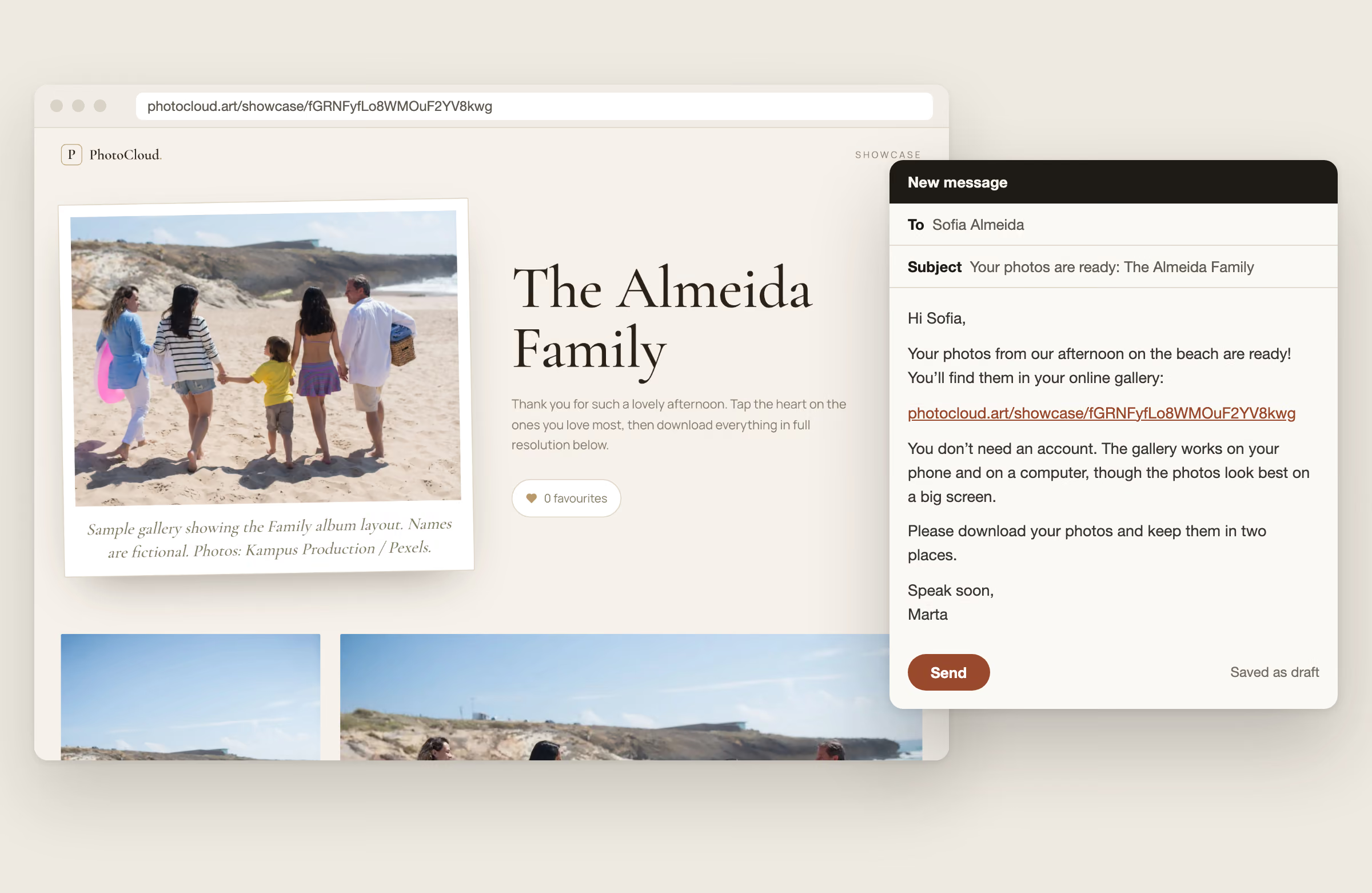
The photos are edited, the gallery link is copied, and then you stare at an empty email. How formal should it be? What do you need to say so nobody replies with three questions? And how do you remind a client about their selection without sounding pushy?
These photographer email templates do that thinking once, so you don’t have to do it for every shoot. They cover the messages that come up with almost every client, from the booking confirmation and the sneak peek to the gallery, the selection and the final delivery. Then come the review request, a reminder to download before the gallery closes and a follow-up a year later.
Replace the text in square brackets, such as [Name], [Link] or [Date], with your own details. The Copy button puts the subject line and the body on your clipboard, ready to paste into Gmail, Outlook or your studio software.
When to send each client email
A shoot is rarely one email. If you know in advance which message is due when, nothing slips, and your client always knows what happens next. The timings below are what works for most portrait, family and wedding photographers, not a fixed rule.
- 01Same day as the bookingBooking confirmation
- 025 to 7 days beforePre-shoot prep and what to wear
- 031 to 3 days after the shootSneak peek
- 04Delivery day, no selection roundGallery delivery
- 05When the proofs are readyPick your favourites
- 062 to 3 days before the deadlineFriendly reminder
- 07After editing the selectionFinal delivery and download
- 081 to 2 weeks after deliveryReview request
- 092 to 4 weeks before it closesDownload reminder before the gallery closes
- 10About a year laterAnniversary and referral follow-up
No selection round? Skip 05 and 06 and send 04 instead of 07.
10 photographer email templates to copy
Each template has a subject line, a short body and one tip. Read it aloud once before you send it. If a sentence doesn’t sound like you, change it: your client booked you, not a template.
1. Booking confirmation
When to send: As soon as the contract is signed or the deposit has arrived, ideally the same day.
Subject: You’re booked: [Session type] on [Date]
Hi [Name],
Thank you for booking me. Your [session type] is confirmed:
Date: [Date] Time: [Start time] to [End time] Place: [Location]
I’ve received your deposit of [Amount]. The remaining [Amount] is due on [Date].
About a week before the shoot I’ll send you a short note on what to wear and what to bring. Until then, if anything changes or you have a question, just reply to this email.
I’m looking forward to it!
[Your name]
Tip: Repeat the date, time and place even if they are in the contract. This is the email clients search for on the morning of the shoot.
2. Pre-shoot prep and what to wear
When to send: Five to seven days before the session: late enough to be remembered, early enough to buy a shirt.
Subject: Getting ready for [Day]: what to wear and bring
Hi [Name],
Our session is coming up on [Date] at [Time]. Here are a few things that help the photos look their best:
What to wear: solid colours or soft patterns work better than logos and bold prints. Choose colours that go together rather than matching outfits.
What to bring: [Water, a hairbrush, a favourite toy for the little ones, a spare top].
Where to meet: [Meeting point, parking tip or what3words link].
If it rains: I’ll check the forecast the day before and let you know by [Time] if we need to move the date.
If little ones need a break, we’ll take one. Some of my favourite photos happen after a wobble.
Most of all, come as you are. My job is to make you feel at ease, and the photos follow from there.
See you soon, [Your name]
Tip: Keep the outfit advice to two or three sentences. A relaxed client photographs better than a perfectly dressed one, and a long style guide makes people nervous.
3. Sneak peek
When to send: One to three days after the shoot, with three to ten edited images.
Subject: A first look at your photos
Hi [Name],
Thank you again for a lovely session on [Date]. I couldn’t wait, so I’ve edited a few favourites already. Here’s a first look:
[Link]
Your full gallery will be ready by [Date]. Until then I’m choosing and editing the rest.
If you share any of these online, I’d love a tag: [Instagram handle].
Speak soon, [Your name]
Tip: Send the sneak peek while the shoot is still fresh. Five strong images this week do more than twenty extra next month.
4. Gallery delivery
When to send: When you deliver all the edited photos at once, without a selection round.
Subject: Your photos are ready: [Gallery name]
Hi [Name],
Your photos from [Occasion] are ready! You’ll find them in your online gallery:
[Link]
You don’t need an account. The gallery works on your phone and on a computer, though the photos look best on a big screen. You can [download the photos one by one / download single photos or the whole gallery as a ZIP file].
The gallery stays online until [Date]. Please download your photos before then and keep them in two places, for example on your computer and in a cloud backup.
I hope you love them as much as I do. If you have any questions, just reply to this email.
[Your name]
Tip: Open the link in a private browser window before you send it. You see exactly what your client sees, without being logged in.
5. Pick your favourites
When to send: When your client chooses from a set of proofs which photos you edit, or which ones go in an album or print order.
Subject: Your proofs are ready: please choose by [Date]
Hi [Name],
Your proofs from our session are ready: [Number] photos are waiting for you.
[Link]
Your package includes [Number] edited images. Tap the heart on the photos you’d like, then [send your selection / reply to this email to let me know you’re done].
Please choose by [Date]. If I haven’t heard from you by then, I’ll choose [Number] for you, as agreed in our contract, so your photos aren’t delayed.
Would you like more than [Number]? Each extra photo is [Price]. Just reply with the extra photos you’d like and I’ll send you an invoice.
These are unedited previews, so colours and skin are not final yet. Your finished photos will arrive about [Number] weeks after your selection.
[Your name]
Tip: Put the deadline in the subject line. A date clients can put in a calendar works better than “in the next few days”.
6. Friendly reminder
When to send: Once, two to three days before the selection deadline. Not the day after it.
Subject: A quick reminder: your selection is due [Day]
Hi [Name],
Just a friendly reminder that your photo selection is due on [Date]. Here’s the link again so you don’t have to search for it:
[Link]
If you’ve already started, your favourites are saved, so you can pick up where you left off.
Need a few more days? No problem, just reply and let me know by when. Otherwise I’ll choose for you on [Date], as agreed, and start editing.
[Your name]
Tip: Offer the extension before they have to ask. Most late selections come from busy families, not from clients who don’t care.
7. Final delivery and download
When to send: When the edited versions of the client’s selection are ready.
Subject: Your finished photos are here
Hi [Name],
Your finished photos are ready! You’ll find all [Number] edited images here:
[Link]
To download them, [tap the download icon on each photo / use the download button for the whole gallery]. On a phone you can save single photos; for the full set a computer is easier.
Please keep two copies, for example one on your computer and one in a cloud backup. The gallery stays online until [Date].
Thank you for choosing me for these memories. It was a real pleasure.
[Your name]
Tip: Say plainly how to download, in one sentence. “Where’s the download button?” is the most common reply to a delivery email.
8. Review request
When to send: One to two weeks after the final delivery, once your client has had time to look through the photos and share them.
Subject: Would you share a few words about your shoot?
Hi [Name],
I hope you’re enjoying your photos! I’d be grateful for a short review. It helps other [families / couples / clients] decide whether I’m the right photographer for them.
You can leave one here: [Review link]
Two or three sentences are plenty: what the session was like, and how you feel about the photos.
And if anything wasn’t right, I’d honestly like to hear that too. Just reply to this email.
Thank you so much, [Your name]
Tip: Send it to every client, not only the happy ones, and don’t offer a discount or free print in return. Google’s review rules forbid both.
9. Download reminder before the gallery closes
When to send: Two to four weeks before the date you gave in the delivery email. Skip it if your galleries stay online for good.
Subject: Your gallery closes on [Date]: time to download
Hi [Name],
A quick reminder that your gallery from [Occasion] will go offline on [Date]:
[Link]
If you haven’t downloaded your photos yet, now is a good moment. Save them on your computer and in a cloud backup, so you have two copies.
Phones get lost and accounts get closed. Your photos shouldn’t go with them.
If you need more time, just reply and I’ll keep the gallery online a little longer.
[Your name]
Tip: Many clients only ever look at their photos on a phone. This email is what stops the “Do you still have our wedding photos?” message three years later.
10. Anniversary and referral follow-up
When to send: Around the first anniversary of the shoot or the wedding, or when your booking calendar for the next season opens.
Subject: A year since your [session type]
Hi [Name],
It’s been a year since your [session type] on [Date], and I was looking through your photos again this week. [One specific memory from the shoot.]
If you’d like to capture [this year / your family as it is now], my [season] dates are open: [Booking link].
And if a friend is looking for a photographer, I’d love to hear from them. Returning clients and anyone you refer get [your offer, if you have one].
Not interested in hearing from me about bookings? Just reply and I won’t email about them again.
Warm wishes, [Your name]
Tip: The specific memory makes or breaks this email: without it, it reads like a newsletter. This one is marketing, so if your clients are in the UK or the EU, make sure your booking terms cover it and keep the opt-out line.
How to write client emails that get read
The subject line says what to do
“Your finished photos are here” gets opened. “Update” gets lost. Put the point of the email in the subject, and the date when there’s a deadline. It also helps your client find the email again in three months, when they want to order a print.
Deadlines as dates, not “soon”
“By Sunday 6 December” goes in a calendar; “in the next few days” doesn’t. The same goes for the date a gallery closes. Our guide to the client proofing gallery covers how many proofs to show and how long to give clients to choose.
Match the tone of the shoot
If you were joking with the family on the beach, a stiff “Dear Mr and Mrs Almeida” feels cold. For corporate headshots, a little more formality is the safe choice. Keep your sign-off the same in every email, so the thread reads as one conversation.
A link, not attachments, and the password separately
A personal Gmail account, for example, allows 25 MB of attachments per email: two or three full-resolution photos. Send a link to a gallery or folder instead. If the gallery has a password, send it in a separate message, such as a text. Our guide on how to deliver photos to clients compares the ways to send that link.
Give a date to download by
Many clients look at their photos on a phone and never download them. Say in the delivery email how long the gallery stays online, and send template 9 once before that date. How long you keep the files belongs in your contract too.
Review requests: ask everyone, offer nothing
Reviews help the next client decide, so asking is worth it. Ask every client, and keep it to one email. Google’s rules for reviews don’t allow you to offer a discount, a free print or any other reward for a review, or to ask only the clients you expect to be happy.
The template asks for an honest review and invites criticism by reply. That is not only fair, it’s useful: a client who tells you privately what went wrong is a client you can still win back.
Weddings: one email for the couple, one for the guests
A wedding has two audiences. The couple gets every photo, while guests often see a smaller set without the private moments. Template 4 works for both: send it to the couple with the full gallery, and give them a shorter version with a separate guest gallery link to forward. The couple stays in charge of who sees what.
For the whole wedding handover, from the sneak peek to the album selection, see how to deliver wedding photos.
Using the templates with PhotoCloud
To be clear up front: PhotoCloud doesn’t send these emails for you, and it doesn’t send reminders. Its share dialog can email the gallery link as a short standard invitation, but personal notes like the ones above go from your own inbox.
What PhotoCloud handles is everything behind [Link]. Your client opens the gallery without an account, on a phone or a computer, with a cover photo and a layout that suits the occasion. The Free plan gives you unlimited galleries with 10 GB of storage, and clients can already mark favourites and download single photos. Galleries don’t expire on their own, so the closing date in templates 4, 7 and 9 is yours to set, or leave out.
Starter, at €11 per month excluding VAT, fits templates 5 to 7. You upload proofs, optionally set how many photos the client can pick, and they send their selection from the gallery. You then deliver the finished photos to the same link. Starter also adds password protection, the full-gallery ZIP download and 300 GB of storage. On Free, clients download photos one by one, so pick the first option of the download sentence in templates 4 and 7; the whole-gallery option needs Starter.
Frequently asked questions
What should a photo gallery delivery email include?
The gallery link, how to download the photos, how long the gallery stays online, and a reminder to keep two copies. Keep it short and put “Your photos are ready” in the subject line.
Should I attach photos to the email?
No. Attachment limits are far smaller than a shoot, and some email apps shrink images. Send a link to an online gallery instead. Our guide on how to deliver photos to clients compares the options.
When should I remind a client about their photo selection?
Once, two to three days before the deadline, with the date and the link again. Say what happens if no selection arrives, for example that you choose for them. More in the client proofing gallery guide.
Can I offer a discount for a review?
No. Google forbids it, as do most review sites. Google also doesn’t allow asking only the clients you expect to be happy, so ask every client once, a week or two after delivery.
Does PhotoCloud send these emails for me?
No. The share dialog can email the gallery link as a short standard invitation. Personal notes, reminders and review requests go from your own inbox, for example with these templates. You can set up the gallery behind the link on the Free plan at no cost.